
Overview
Some practices do not have advanced phone systems or IVR capabilities that allow patients to choose between receiving a text or leaving a voicemail. Call Forwarding to Curogram enables these practices to offer Missed Call Auto Response, Voicemail-to-Text, and Press-to-Text functionality with minimal configuration.
By forwarding calls to a Curogram virtual number, practices can ensure that patient calls are never missed and are automatically converted into actionable conversations.
Feature Availability
 Toggle: ON / OFF
Default State: OFF
When OFF
-
Feature is disabled
-
Section remains collapsed
-
No Press-to-Text or Voicemail automation will trigger, even if call forwarding is active
When ON
-
Feature is enabled
-
Section expands
-
System evaluates virtual number assignment
-
Call forwarding workflows become active
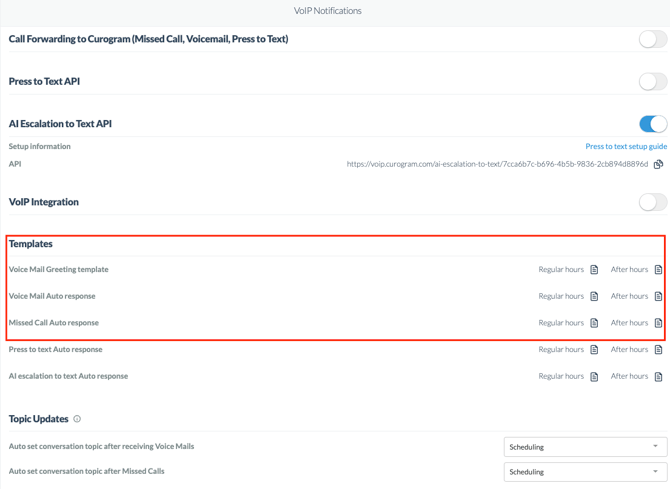
Access this go to Curogram App> Settings> Account Configuration>VoIP Notifications
Curogram Virtual Number
What Is This?
This is the phone number your practice forwards calls to so Curogram can respond automatically.
What You’ll See
-
Pending – A number is being assigned to your practice

-
Phone Number Displayed – Your number is ready for call forwarding

Once your number is assigned, it will automatically appear here.
What Happens When a Patient Calls
1. Press-to-Text
If the patient presses 1 when prompted:
-
A conversation is created in Curogram
-
Your Press-to-Text auto-response is sent to the patient
-
Your team sees a Press-to-Text notification in the dashboard
This allows patients to quickly switch from a phone call to texting.
2. Voicemail
If the patient stays on the line and leaves a voicemail:
-
The voicemail appears in the conversation dashboard
-
The voicemail recording is attached
-
A transcription is shown when available
-
Your Voicemail auto-response is sent automatically
Even silent or very short voicemails will still trigger a response.
3. Missed Call
If the patient hangs up before leaving a voicemail and does not press 1:
-
A missed call notification appears
-
Your Missed Call auto-response is sent
This ensures patients still hear back even if they don’t leave a message.
Call Forwarding Greeting (What Patients Hear)
Curogram provides customizable voice greetings that are played when patients call.
Regular Hours (Default Message)
“Thank you for contacting us. If you wish to receive a text from us, please press 1. If you would like to leave a voicemail, please wait for the tone.”
After Hours (Default Message)
“Thank you for contacting us. The office is currently closed. If this is an emergency, please dial 911. Otherwise, if you wish to receive a reply from us when we open, please press 1. If you would like to leave a voicemail, please wait for the tone.”
You can customize both greetings in the Templates section at any time.
Important Call Behavior Rules
-
Press-to-Text only works before voicemail recording begins
-
Pressing 1 after the voicemail tone will not send a text
-
Hanging up before recording starts triggers a Missed Call response
-
Blank or silent voicemails still receive a voicemail response.
-
Messages are sent based on regular hours vs after-hours automatically.